显示标签为“obd2eshop”的博文。显示所有博文

2019年6月5日星期三

Launch CRP123E vs CRP129E vs CRP123 vs Creader VIII vs CRP129

LAUNCH Creader CRP123E and CRP129E, designed with advanced hardware and more powerful functions, already replace CRP123, Creader VIII & CRP129.

Look at this comparison table:

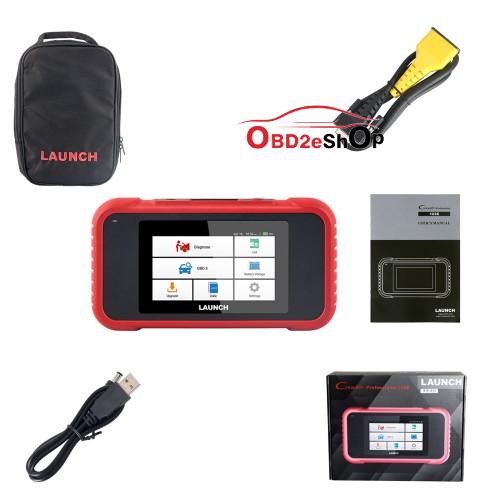

creader-crp123e-package

Look at the large image of
LAUNCH Creader CRP123E:
Source: http://www.obd2eshop.com/wholesale/launch-crp123e-code-reader.html

No special functions

Android based O.S., 5' inch touch screen, easy to use.
More cars covered, updated version of CRP123 and Creader VII+
Fast VIN autodetect (will read VIN information when you connect Car)
Free update lifetime, and one-click update via WiFi
Automatically generate and upload diagnostic reports

Multi-protocol: OBDII, EOBD, JOBD, KOBD
Multi-language: English, Spanish, French, German, Italian, Russian, Japanese, Korean, Portuguese
And works for the systems Engine , ABS Airbag , SRS and Transmission 

And the large image of LAUNCH Creader CRP129E:
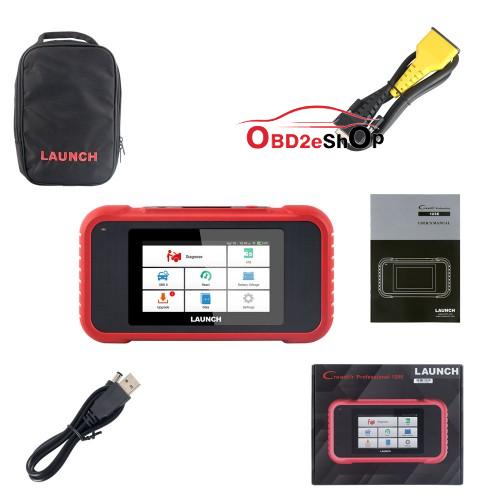
creader-crp129e-package
Source: http://www.obd2eshop.com/wholesale/launch-x431-crp129e-obd2-creader.html

Support Multi-Protocols: OBDII , EOBD, JOBD , KOBD
Lifetime Free Update , Support One-Click Update Online via Wifi
Support Multi-language :English, Spanish, French, German, Italian, Russian, Japanese, Korean, Portuguese

CRP129E is an upgraded Version of CRP129 and Creader VIII , Support more car
Fast VIN autodetect, CRP129E will read VIN information when you connect Car
Automatically generate and upload diagnostic reports
Support 5 reset Function : EPB/Oil/SAS/ ETS/TPMS reset
5'inch Android Touch Screen, Easy to operate
CRP129E support multi-protocols test for a complete diagnosis.
CRP 129E also supports the system diagnosis of Engine , ABS Airbag, SRS and Transmission system

Enjoy.

www.obd2eshop.com


Source:http://blog.obd2eshop.com/why-launch-crp123e-crp129e/

2019年5月26日星期日

Nissan Xtrail EDC16CP33 injectors with Launch X431: Done

Problem description: Read flash by obd2, injectors coding gone. I’d tried use option in galletto coding can but no result. I couldn’t write codes. Is chance write codes in eeprom manual? in .rar is eeprom without codes and file with codes. THANKS
8H8O3SG- 1 FROM GEARBOX
8IHK5WG-2
71HV3WE-3
8SHT8IF-4

Info: it is keyless


What I tried to do:
I tried write file with my codes but i couldn’t write it… i have two errors first is bad coded injectors and chain immu. this happened after write flash by obd. coding injector was gone launch x431 didn’t code.

Same experience for sharing:
Had these problems with same ECU EDC16CP33, just on Qashqai (with keyless system…). You won’t be able to adapt injectors when you have problems with IMMO – “chain immu”, first adapt keys/ecu with launch. When you choose Nissan, when first screen pop’s up after bt is connected you should go to special functions or coding, and adapt the ecu, after immo is sorted and car starts, then you can write injector codes with diagnostic equipment Had this problem, sorted with Launch X431 without problems.

Finally Solved:
With hez editor i edit my corrupted eeprom some things add some delete… atlast was one error bad coding injectors with launch write codes ( first not from gearbox like in Renault ) 1 is from time belt .. and car start without problem.

Here is my work with all files and how i fix my original eeprom without virgin. I hope it will help for somebody.
Password:

Question:
can do virgin? and program the unit again, while recovering the loss
Once I wrote down the injectors in flash. restored with ecm opening, while there was fullflash bottom ecm
Answer: I fix my corrupt eeprom with HEX CMP very easy. but i spend few hours.. atlast is 4kb data memory. my work with files is here.

Good luck.

Thanks to @3inferno3 (DK Veteran).


Related Posts:

http://blog.obd2eshop.com/nissan-xtrail-edc16cp33-injectors-with-launch-x431/

2018年12月11日星期二

How to make X431 HD work in the Android device without X431pad?

The X431 original Pad use Android OS, therefore the app for X431 adapter can be use with the Android device without X431 Pad original!
LAUNCH X431 HD Heavy Duty Adapter

Just use my link and install it on any appropriate android.

It can work on both cars and trucks if you have the appropriate subscription.
Also, the good folks who manage x-diag pro can hook you up with the subscription to cover both trucks and cars, ie 12v and 24v.

That means: For 12v truck easydiag can work if you have files ect. But for 24v truck u will blown unit  Original Xpro3 or launch devices for truck 24v use adaptor to protect unit .

2018年11月28日星期三

HOW TO USE X431 PRO / PRO3 FOR BMW 2010 E-SERIES FRM CODING?

BMW FRM Module trouble is very typicaly trouble on BMW which cause:
Headlight out of control: light on all the time or can’t light on.
Turn light and car window lifter work incorrectly.
Communication trouble.
It will not only cost a lot of money to repair frm module,but also many time on it.So OBD2eshop shares  how to repair bmw frm module guide here:
How to use X431 Pro / Pro3 for BMW 2010 E-series FRM coding in step-by-step procedure.
Select BMW.


bmw-2010-e-series-frm-coding-with-x431-1


Confirm.


bmw-2010-e-series-frm-coding-with-x431-2


Connecting Bluetooth.


bmw-2010-e-series-frm-coding-with-x431-3


Loading…
Processing…
Select “Coding / Program”.


bmw-2010-e-series-frm-coding-with-x431-4


Select car model: 3 series


bmw-2010-e-series-frm-coding-with-x431-5


Select “Coding”.


bmw-2010-e-series-frm-coding-with6-x431-6


Click on “Yes”.


bmw-2010-e-series-frm-coding-with-x431-7


Select the replaced system “Footwell Module (FRM) is just replaced”.


bmw-2010-e-series-frm-coding-with-x431-8


Reading vehicle data, please wait…


bmw-2010-e-series-frm-coding-with-x431-9


Check VIN please.


bmw-2010-e-series-frm-coding-with-x431-10


Reading vehicle data…


bmw-2010-e-series-frm-coding-with-x431-11


Select “Coding system List”.


bmw-2010-e-series-frm-coding-with-x431-12


Please check the VIN.


bmw-2010-e-series-frm-coding-with-x431-13


Reading vehicle data…
Select “Footwell module”.


bmw-2010-e-series-frm-coding-with-x431-14


The software will display vehicle order, please select “Feedback”.


bmw-2010-e-series-frm-coding-with-x431-15


Select “Recoding”.


bmw-2010-e-series-frm-coding-with-x431-16


Select “Yes”.


bmw-2010-e-series-frm-coding-with-x431-17


Recoding…it will take a little time.
Recoding has been completed.


bmw-2010-e-series-frm-coding-with-x431-18


For any question, please send the log to Launch with a short note, so we can serve you better.

Source:
http://blog.obd2eshop.com/bmw-e-s-eries-frm-coding-with-x431-pro/