2017年3月18日星期六

Launch X431 V 8inch : Australian, Indian, Malaysian cars OK

Launch X431 V 8 inch OBD scan tool, what cars can work and cannot work? Ok with Indian, Australian, Malaysian vehicles?
Here, free download Launch X431 V 8 inch tablet car list.
The new Launch X431 V has the fullest vehicle coverage, including 69 car brands about 220 car models from Europe, USA, Australia and Asia. So, the device has what it takes to be used globally.

Q: Can Launch X431 V 8 inch support Indian, Australian, Malaysian cars?
A: Yes. It works perfect with vehicles made in India, Australia, Malaysia.

Q: Any good for European and American cars?
A: Launch X431 V 2017 version must be the best solution of European and American vehicles diagnostics for repairing work in a garage, because it covers most European and American car models.

Q: Any new models added in the version 2017 Launch X431 V?
A: Yes. It adds LEXUS, BENTLEY, EURO FORD, LANCIA, HM(HM), MAYBACH, BUGATTI, ROMEO, ACURA, INFINITI, DACIA.

Here, free download Launch X431 V 8 inch car list.
 Launch X431 V 8 inch car list(1)

 Launch X431 V 8 inch car list(2)

 Launch X431 V 8 inch car list(3)

 Launch X431 V 8 inch car list(4)

 Launch X431 V 8 inch car list(5)

 Launch X431 V 8 inch car list(6)

 Launch X431 V 8 inch car list(7)

 Launch X431 V 8 inch car list(8)

 Launch X431 V 8 inch car list(9)

 Launch X431 V 8 inch car list(10)

2017年3月16日星期四

Launch X431 Pro 3 Review: working perfectly

I was asked by the technician team to use the Launch X431 Pro 3 in the the technical workshop for a few weeks and to provide an objective review of its operation and performance. I was interested to see how things had developed for Launch, as my previous experience of Launch diagnostic equipment was the first generation, monochrome x431. When the equipment arrived, the carry case looked the same as the original x431, however, inside the case was a completely different proposition. The host hardware was a smart, semi-rugged, android tablet, known as a X431 Pro 3. This was partnered by a relatively compact Bluetooth vehicle communications interface known in Launch parlance as a DBScarII.

Launch X431 Pro 3
The Launch tablet was light and compact and was very comfortable in hand. For such a compact package, the battery life was remarkable, due to the large capacity, integrated 6340 mAh battery. Another potential pitfall of a small host unit (the unit measures 205 x 275 x 52 mm) is the screen display, however, the designers have come up with a unit that is equally clear to view in broad daylight as it is inside the workshop, thanks to the screen finish and a good quality display. The software look and feel are both very good in terms of layout and size and the touchscreen operation worked flawlessly in conjunction with its large, clear icons, see the pic below. The device was quick to get going from the initial power up and it was also quick to operate. The response in moving through the menus and executing tasks was immediate. Downloading and running updates (which is partly down to internet connection speed) was reasonable. The ‘services/update’ section of the software on the X431 Pro 3 notifies the user of pending updates, and it’s a ‘click and go’ procedure to set the updates running.
Launch X431 Pro 3 review 1

During general use I found that the Bluetooth communications interface connected reliably each time I used it. The communication with the car was quick when performing codes and data evaluation, and even when streaming live data it was reliable. During my testing the Bluetooth had a reliable connection range of around 5 meters. The designers of the tool have implemented a neat alarm feature which prompts the user to remove the communication device when each diagnostic session is completed.

How did it perform?
In terms of system coverage, the X431 Pro 3 has a wide and comprehensive system coverage, including all of the common makes and models. Obviously, the devil is in the detail regarding special functions, coding etc. A detailed report of software coverage was beyond the scope of my brief. However, I did use the X431 Pro 3 for a typical range of general workshop tasks (codes, data, actuators, special functions and adaptive resets) on a typical range of workshop makes and models, and it didn’t fall short on anything I asked of it.
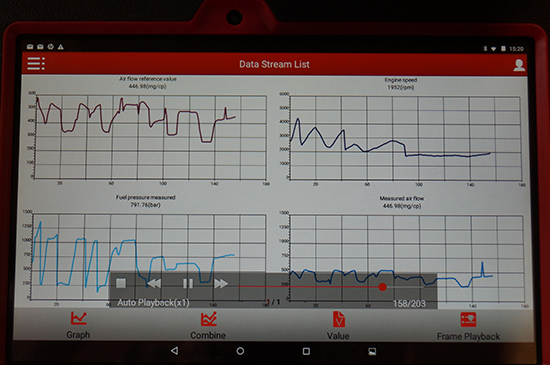
One of the features I believe that a diagnostic scan tool should have is graphing a live data stream. The reason that this is so important is to enable the vehicle technician to examine the relationships between the various sensors, actuators and calculated values. This is critical for intermittent fault finding and for vehicle problems which don’t set diagnostic trouble codes. In this respect the X431 Pro 3 did a good job. The live data is selected from an array of available parameters and then graphed. The graphed data can be shown as separate graphs or combined in a job graph. The scales are auto ranging and they can be reset to align them to the current operating conditions.
Launch X431 Pro 3 (2


Personalised customer reports
Getting paid for your diagnostics is a common discussion for technicians. The Launch X431 Pro 3 has an integrated reporting function. The business details can be set to appear in the header Diagnostic Report, and the report can be generated by the technician on demand.
Launch X431 Pro 3(4

The reports are saved to the internal memory (which is a not insignificant 16 or 32 GB, depending on the hardware specification), for later review. The reports are able to be saved in PDF format, and as the tablet is equipped with WIFI, these can be emailed to the office or directly to the customer. Printing the reports directly is a little more challenging. The print button contained within the tablet is programmed to use the optional bespoke Launch printer. In my case, I had to install a separate PDF viewer and the android version of my HP ePrinter driver. This made getting the reports off the device a little long winded. My opinion is that it would be more convenient if the print button could be configured to call other installed printer drivers.

In summary
My overall impression of the Launch X431 Pro 3 scan tool was very positive. I found the hardware very well suited to the purpose, rugged, fast, easy to use and light. The software was slick in its operation and it did all I asked of it during the test period. I made a couple of calls to the team at Launch and my queries and questions were dealt with promptly. This segment of aftermarket, multi marque diagnostic scan tools is extremely competitive. The Launch X431 Pro 3 is a highly competent product that discharges its duties very well.
Recommend one powerful lanunch new item arrived at obd2express.co.uk-launch x431 v 8inch ,

2017年3月6日星期一

How To Register Launch X431 V 8″ Diagnostic Tool?

This is a tutorial on how to register  launch x431 V 8inch Bluetooth Wifi Pad   step by step.
Start here:
Tap “Login” on the upper right corner of the main menu screen:
click-on-login

1. If you are a new user, tap “New Registration”. see Fig. 2.
user-information

Note: To obtain better service, you need to provide real information. In Fig.2, fill in the information in each field (Items with * must be filled). After inputting, tap “Register”, a screen similar to the following will appear:
activate

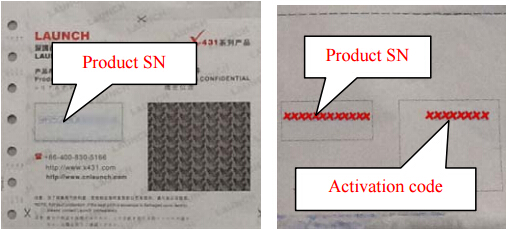
In Fig. 3, input the Serial Number and Activation Code, which can be found in the password envelope.
serial-number

Note: To exit and activate it later, tap “Skip”. In this case, you can activate your connector by tapping “Activate Connector” in “Profile”.
Tap “Activate” to finish your registration. See Fig. 5
finish-your-registration

To download the diagnostic software, tap “Yes”. See Fig. 6.
Tap “No” to download and install it later.
download-software

In Fig. 6, tap “Update” to start downloading. It may take several minutes to finish it, please be patient to wait.
To pause downloading, tap “Pause”.
To resume it, tap “Continue”. Once download is complete, the system will install the software package automatically.

2. If you have registered to be a member, input your name and password, and then tap the “Login” button to enter the main menu screen directly.


2017年2月26日星期日

LAUNCH X431 HD Heavy Duty Adapter Beginners User Guide

Launch X-431 Heavy Duty HD Truck Diagnostic Adapter  works together with X431 V/V+/PRO/PRO 3/PAD II, turn your device to heavy duty scanner.
Here is a user manual for new arrived LAUNCH X431 HD Module Heavy Duty Truck Diagnostic Adapter

Incl four parts:
Part 1:Knowledge of X-431 HD Module
Part 2:How to connect OBD II vehicle
Part 3:How to connect non-OBD II vehicle
Part 4: Download and Install X-431 HD Module App
Part 5:Activate X-431 HD Module
Part 1:Knowledge of Launch X-431 HD Module
X-431 Heavy-duty Truck Module is a new generation heavy-duty truck fault diagnostic tool developed by Launch Tech regarding internet application on the basis of Android OS. It communicates with X-431 PRO3/X-431PAD II through Bluetooth to achieve fault diagnosis for various car models and full systems. Advantages include wide car model coverage, powerful test function, more special functions and accurate test data, etc.
Features
1. Applicable to diesel vehicle of 12V & 24V voltage; no need for battery conversion when testing 24V trucks;
2. Supports a wide range of vehicle models covering Asian, American and European etc;
3. Powerful testing function enables you to diagnose all electronic control system;
4. International design to adapt to all diagnostic sockets.
Ports and Indicators of X-431 HD Module

how-to-use-launch-x431-hd-1 how-to-use-launch-x431-hd-2 how-to-use-launch-x431-hd-3
Technical Parameters
* Working voltage: 8~24V
* Working temperature: -15℃ ~ 60℃
* Storage temperature: -20℃ ~ 70℃
* Relative humidity: 10% ~ 80%
* Dimension: 110 mm * 178 mm * 50 mm
Part 2:How to connect OBD II vehicle
Follow the steps described below to proceed:
1. Locate vehicle’s DLC socket. The DLC is usually located 12 inches from the center of the instrument panel
(dash), under or around the driver’s side for most vehicles. If Data Link Connector is not located under
dashboard, a label should be there telling location. If the DLC cannot be found, refer to the vehicle’s
service manual for the location
how-to-use-launch-x431-hd-4
2. Connect one end of the main cable to the diagnostic socket, and then connect other end to the vehicle’s
DLC (For non-16 pin DLC, you need to choose the corresponding diagnostic connector).
how-to-use-launch-x431-hd-5
Part 3:How to connect non-OBD II vehicle
Choose one of the following to connect non-OBD II vehicle:
1. Via Cigarette Lighter
how-to-use-launch-x431-hd-6
2. Via Battery Clamps Cable
how-to-use-launch-x431-hd-7
Part 4: Download and Install X-431 HD Module App
1. Visit the LAUNCH website and download the application corresponding to X-431 HD module; Note: If downloading using the diagnostic tool please make sure Wi-Fi has good or strong signals. 2. Follow the on-screen instructions to install it. Once installation is complete, an application icon will appear on the HOME screen.
Part 5:Activate X-431 HD Module
After purchasing X-431 HD module, you have to activate it before use. Follow the steps below to proceed:
1、 Launch the application, and tap to enter;
2、 Tap “Profile” from the pull-down menu, and then taphow-to-use-launch-x431-hd-8 “Connector Activation”;
3、 Input the Serial Number and Verification Code, which can be found in the included password envelope. Tap “Activate”.

2017年2月23日星期四

2017 Launch X431 V WINS! Old X431 Diagun III & X431 IV fail

2017 Launch X431 V price WINS at obd2express.co.uk
2017 Launch X431 V (x431 pro) WINS in firmware update!
So, it defeated and successfully replaced the olf Launch X431 Diagun III and X431 IV scan tools. Details of the new launch x431 scan tool.
 Launch X431 V

Launch x431 v price:
It’s the best price online

How much do you know Launch x431 v?
Launch X431 V is a new diagnostic tool released by Launch tech. It’s composed of an X-431 V pad computer, a protection sleeve, a DBScar diagnostic connector and many OBD1 to OBD2 connectors. Communicating with your car by DBSCAR connect via Bluetooth, it reads DTC and does full system diagnosis on the car through the X431 Pro Pad for full car models. So, it successfully replace X431 Diagun III or X431 IV. Meanwhile, taking advantage of mobile internet, it integrates more application and service, such as creating maintenance data base and case library, providing instant maintenance information, establishing public and private maintenance social circle etc. As a result, it builds a broad vehicle diagnostic community, which helps you to share vehicle maintenance knowledge online, exchange vehicle maintenance experience online and provide vehicle maintenance related service support online. This will be another revolution raised by Launch in the vehicle diagnosis industry.

What’s updated/improved in 2017 Launch x431 v?
Compared it with old x431 scan tools, it’s easy to find that 2017 launch x431 v has been improved in firmware only. In the aspect of function, it works as the old version.
What’s updated/improved in 2017 Launch x431 v?


New Launch X431 V (X431 Pro) Feature
1 tablet with high configuration;
2 multi-point capacitive touch screen;
3 Bluetooth diagnostics;
4 online service
5 light and small;
6 multitasking on a screen;
7 WIFI support;
8 open Android platform;
9 many additional functions.

Launch x431 V Language Available:
English, German, Japanese, Russian, French,  Spanish, Korea , Traditional Chinese

2017 Launch X431 V Function:

1. Full Diagnose + Special Function:

X431 V can diagnose the electronic control system of prevailing vehicle models covering Asian, European, American and China. Full range car models and full car system diagnose make it a professional automotive diagnostic tool.

- OBDII Diagnosis: Read DTCs, Clear DTCs, Read datastream, Special functions etc;

- Special function: BMW idle study, BMW injection rate adjustment, BMW battery replacement, Nissan matching key.


2. Connecting by Bluetooth
Bluetooth Distance: 10M (Without Obstacle)

X431 V communication via bluetooth, very easy to use.  X431 V Pad computer specially designed for Android platform with clear and user-friendly interface. X431 V Pad computer equipped with an exclusive X-431 V protection sleeve to prevent it from being damaged;

3. Browser:
Built-in Wi-Fi module makes surfing on the internet freely;

4.Settings:
To configure your personalized X-431 V through it;

5. Search:
Enables you to locate your target quickly and conveniently;

6. Email:
Allows you to send and receive email. External POP3 or IMAP email account for some common Web email service provider can be added;

7.File Manager:
You can manage the files or downloaded files stored in SD card efficiently;

8. Other Additional Functions:
Alarm, calendar and calculator etc.

9. Applications:
Other android based applications can be customized to install or uninstall.

Launch x431 v Car List:
For Acura, for Changan, for Daweoo, for Gaz, for Hafei, for Huachen, for Jiao, for Lexus, for Xiali, for Xinkai, for Bez,for Fiat, for Holden, for Maruti, for Opel, for Peugeot, for Saab, for Ssangyong, for Tata, for Changhe, for Flyer, for GMSA, for Infiniti, for Mahindra, for Perodua, for Proton, for Qirui, for Tlisuzu, for Zhongshun, EOBD2, for Euroford, for G-M, for Jagar, for Renault, for Smart, for Sprinter, for USA for Ford, for VAZ, for VW, for Changcheng, for Dacia, for Ford, for HaoQing, for Jinlong, for Liuwei, for Rover, for ZhongTai, for ZhongXing, for HM, for Isuzu, for Jacty, for JPIsuzu, for Mazda, for Seat, for Skoda, for Suzuki, for BW, for Daihatsu, for Mitsubishi, for Porsch, for Toyota, for Volvo, for Adi, for Chrysler, for Citroen, for Hyundai, for Kia, for Lancia,for Landrover,for Nissan, for Romeo and for Sbaru.

Here is the communication diagram for reference.
Launch x431 pro how to use

Launch x431 pro how to use


2017 new Launch X431 V (X431 Pro) Parameter:
Operating System: Android
CPU: Quard Core 1.3GHz
Battery: 4290mh, rechargeable polymer lithium battery
Standby time: it is subject to the using environment. Generally it can keep working for 4 hours.
Extension memory card: 32G Micro SD(TF) card supported
Memory: 1MB
Storage capacity: 2GB
LCD: 7.0 inch
LCD resolution: 1280X800
Touch screen: 5 points capacitive touch screen
Cameras: 2 mega rear and 5 mega front
Wi-Fi: supported
Bluetooth: supported
Working temperature: -10 ~ 55 (14°F to 131°F)
Storage temperature: -20 ~ 70 (-4°F to 158°F)

x431 V DBSCAR Connector Parameter:
Working voltage: 9 ~15V
Average working current: about 35mA
Standby current: about 25mA
Working temperature: -20 to 55 (-4°F to 131°F)
Storage temperature: -30 to 70 (-22°F to 158°F)
Storage humidity: <80%
Working humidity: <60%
Net weight: about 26g

Lauch x431 v Packing List:
X-431 v pad computer
Password envelope
X-431 v protection sleeve
DBScar diagnostic connector
OBD II extension cable
Cigarette lighter cable
Power adaptor
USB data cable
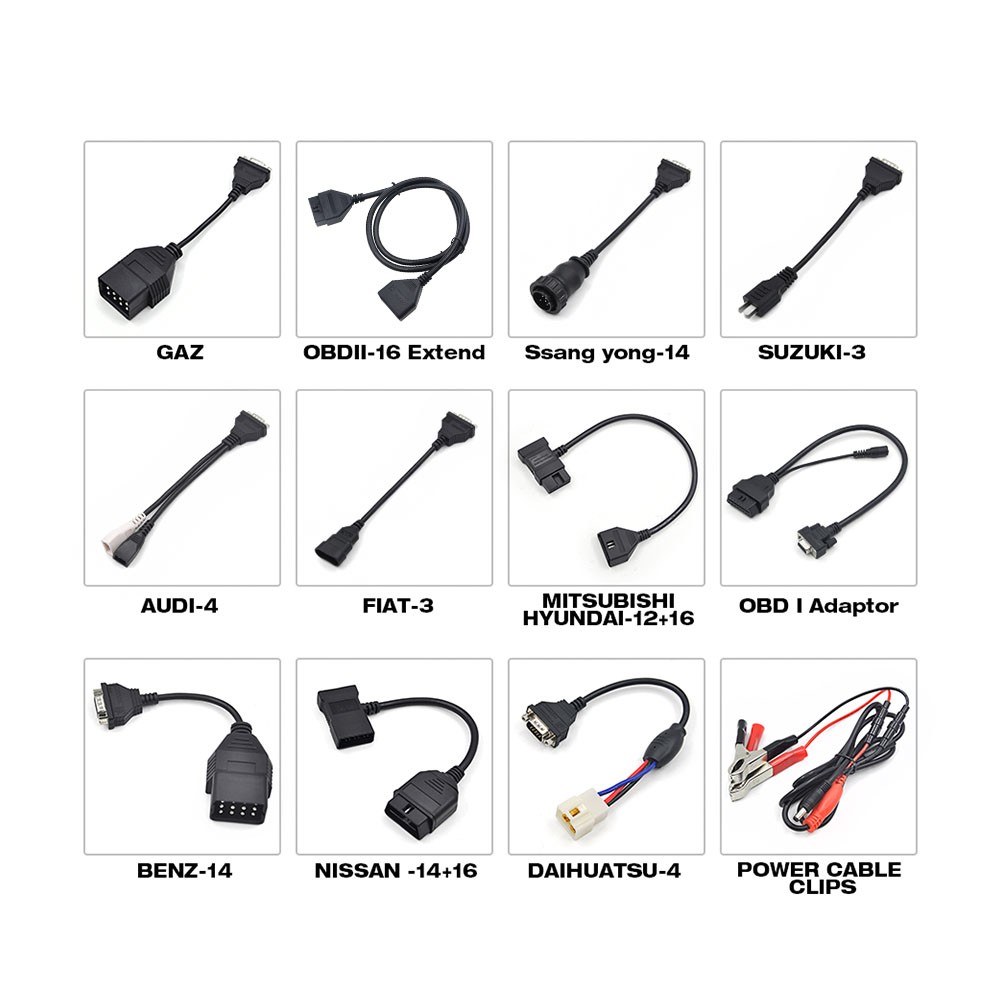
Non-16pin connector

Launch X431 V 8inch Tablet Full System Diagnostic Tool Support Wifi/Bluetooth

Launch X431 V 8inch Tablet Full System Diagnostic Tool Support Wifi/Bluetooth

Launch X431 V 8inch Tablet Full System Diagnostic Tool Support Wifi/Bluetooth

Launch X431 V 8inch Tablet Full System Diagnostic Tool Support Wifi/Bluetooth

Launch X431 V 8inch Tablet Full System Diagnostic Tool Support Wifi/Bluetooth

Launch X431 V 8inch Tablet Full System Diagnostic Tool Support Wifi/Bluetooth

Launch X431 V 8inch Tablet Full System Diagnostic Tool Support Wifi/Bluetooth

Launch X431 V 8inch Tablet Full System Diagnostic Tool Support Wifi/Bluetooth

Launch X431 V 8inch Tablet Full System Diagnostic Tool Support Wifi/Bluetooth

Launch X431 V 8inch Tablet Full System Diagnostic Tool Support Wifi/Bluetooth

Launch X431 V 8inch Tablet Full System Diagnostic Tool Support Wifi/Bluetooth

Launch X431 V 8inch Tablet Full System Diagnostic Tool Support Wifi/Bluetooth

Launch X431 V 8inch Tablet Full System Diagnostic Tool Support Wifi/Bluetooth